 Created in 2007 by the Pennsylvania Office of Child Development and Early Learning (OCDEL), The Pennsylvania Key implements the work and supports the policies developed and managed by OCDEL. Learn More. >
Created in 2007 by the Pennsylvania Office of Child Development and Early Learning (OCDEL), The Pennsylvania Key implements the work and supports the policies developed and managed by OCDEL. Learn More. >
Created in 2007 by the Pennsylvania Office of Child Development and Early Learning (OCDEL), The Pennsylvania Key implements the work and supports the policies developed and managed by OCDEL. Learn More. >Click Login in the top right corner.

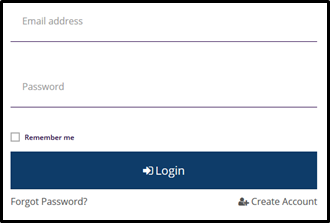
Enter your email address and password, then click Login.
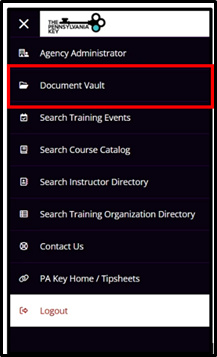
Select Document Vault within the left-hand menu.
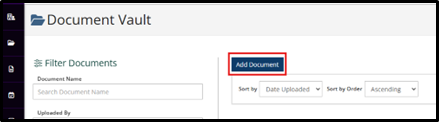
Click Add Document.
Click Find File to upload the document(s) from your device.

Click Open to search for the document(s) on your device. You can upload multiple documents at once.

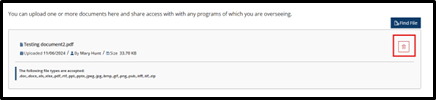
Click Trash to delete any files you uploaded by mistake or no longer need.
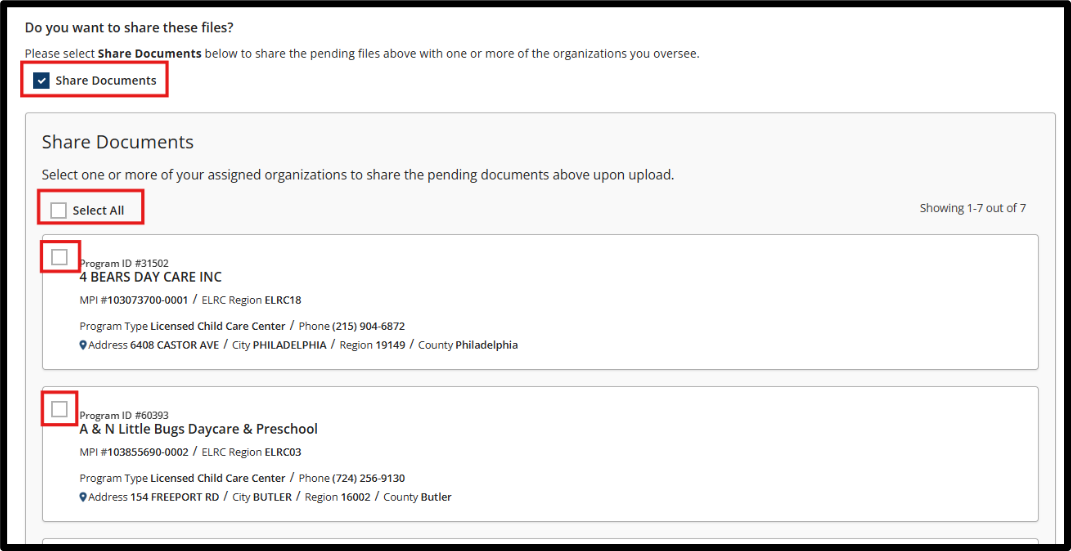
Check the Share Documents box to share the documents with one or more programs you oversee.

Share Documents with Programs:
Check the Share Documents box. This enables document sharing options.
View the list of programs you oversee. All associated programs will appear below, each with a checkbox.
Select the programs to receive the documents:
If you have uploaded more than one document, all selected documents will be shared with the programs you choose.
Click Save.

The PD Registry
registry@pakeys.org
1-800-284-6031