 Created in 2007 by the Pennsylvania Office of Child Development and Early Learning (OCDEL), The Pennsylvania Key implements the work and supports the policies developed and managed by OCDEL. Learn More. >
Created in 2007 by the Pennsylvania Office of Child Development and Early Learning (OCDEL), The Pennsylvania Key implements the work and supports the policies developed and managed by OCDEL. Learn More. >
Created in 2007 by the Pennsylvania Office of Child Development and Early Learning (OCDEL), The Pennsylvania Key implements the work and supports the policies developed and managed by OCDEL. Learn More. >This quick guide supports early childhood and school‑age educators across Pennsylvania in finding relevant professional development (PD) opportunities using Pennsylvania’s Professional Development (PD) Registry.
Log in to the PD Registry: papdregistry.org
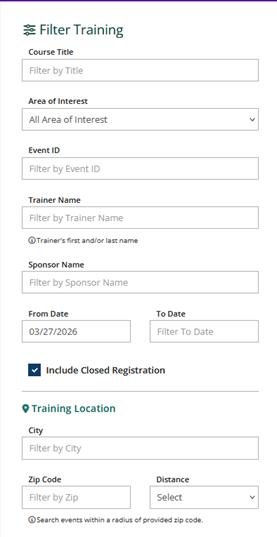
To search for Professional Development Events, click on Search Training Events (left-hand menu) or Search for Training (home screen)
Educators can refine results using one or more of the following filters:
Using multiple filters at once helps narrow down results quickly and efficiently.
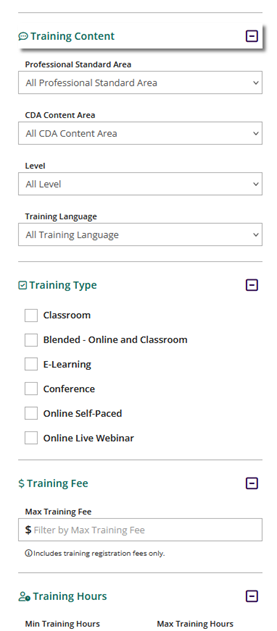
Use the Areas of Interest dropdown menu to locate trainings related to:
Need help registering? Visit How to Register for Professional Development Events for step-by-step‑ guidance.
The PD Registry
registry@pakeys.org
800-284-6031