 Created in 2007 by the Pennsylvania Office of Child Development and Early Learning (OCDEL), The Pennsylvania Key implements the work and supports the policies developed and managed by OCDEL. Learn More. >
Created in 2007 by the Pennsylvania Office of Child Development and Early Learning (OCDEL), The Pennsylvania Key implements the work and supports the policies developed and managed by OCDEL. Learn More. >
Created in 2007 by the Pennsylvania Office of Child Development and Early Learning (OCDEL), The Pennsylvania Key implements the work and supports the policies developed and managed by OCDEL. Learn More. >Click Login in the top right corner.

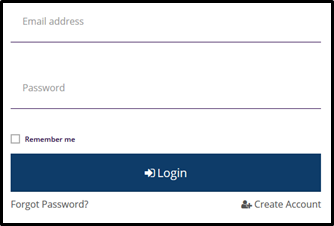
Enter your email address and password, then click Login.
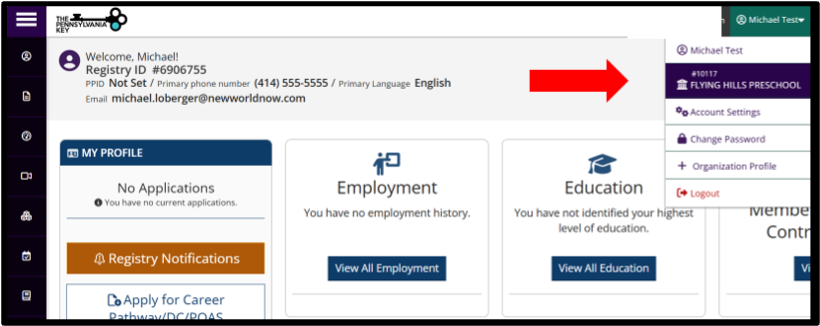
Click on your organization name listed under your name in the upper right context menu.
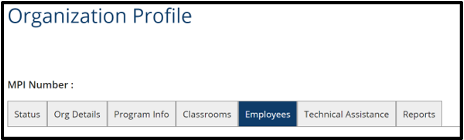
Click on the Employees tab.
You will see a list of your employees. Click on the 3 dots in the blue box and then click Update for any employee with a Self-Reported status.
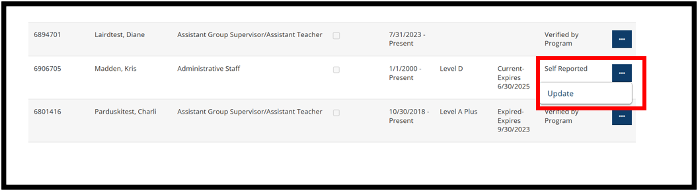
You may also end date an employee by clicking the same 3 dots in the blue box next to the Verified Status.

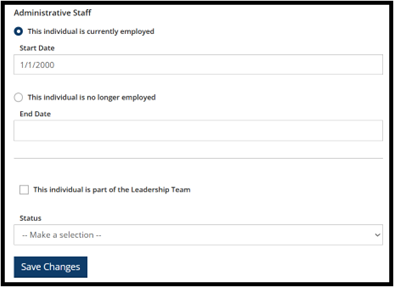
Enter the start date of the employee.
If the employee is no longer employed at your organization, click This individual is no longer employed and add the end date.
Check the box for This Individual is part of the Leadership Team if applicable.
Click on the status drop down and click Verified by Program.
Click Save Changes.